【2026 File Management】File version management: why we all invent our own naming schemes
Shared folders, Dropbox, and NAS weren't designed to manage file history — they have 4 structural gaps that push the work back onto your discipline. This article unpacks each gap, explains why naming-rule PDFs collapse after 6 months, and admits which gaps Keeply closes and which it doesn't.
It’s not your discipline. Your tool wasn’t designed for this.
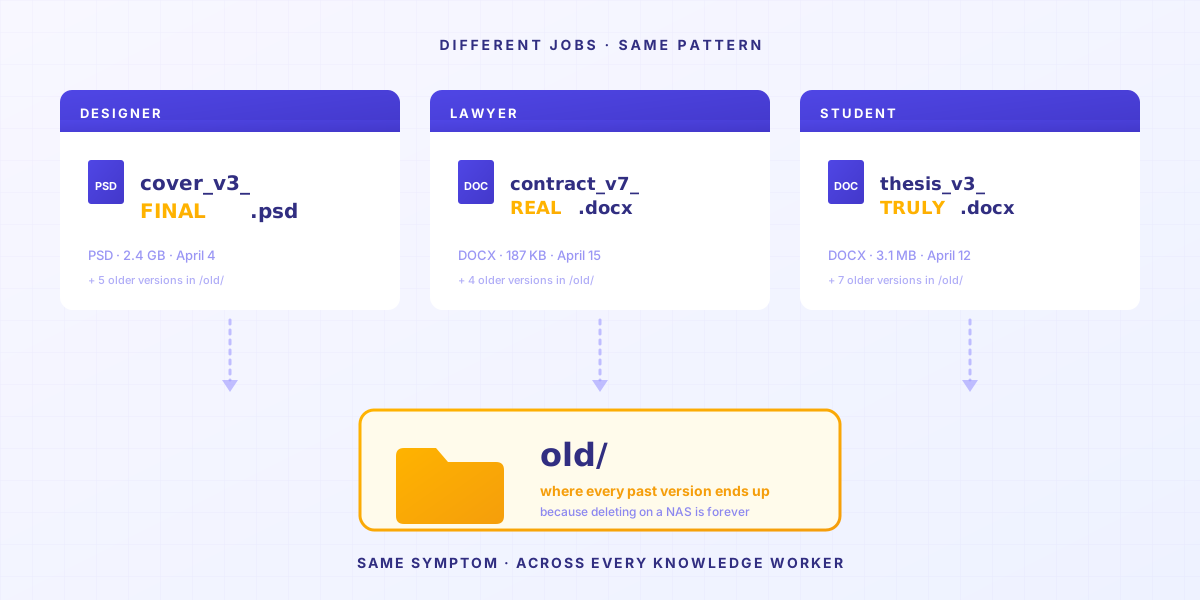
Take three people.
A is a freelance designer. Desktop has _v3_final_FINAL.psd.
B works at a law firm. Drive has contract_v7_clientcopy_2025-04-15.docx.
You, reading this, might be looking at thesis_chapter3_post-advisor_truly-final-v2.docx right now.
Different jobs. Different filenames. Same symptom.
Not because they all have OCD. Because if you don’t do this, your files turn into a mess. And on a NAS, deleted means gone for good. So you end up with an old/ folder, parking every past edit.
And it’s not three unlucky people. In M-Files’ 2019 survey of information workers, 96% said they hit some difficulty finding the most recent version of a file. Almost everyone is quietly fighting the same thing.
TL;DR — Shared folders, Dropbox, and NAS drives weren’t designed to manage file history. They have 4 structural gaps, and each one pushes the work back onto you. This article unpacks each one. And admits which Keeply solves and which it doesn’t.
Article map
- The “previous version” button never existed
- The 30-day version history has fine print
- Version history tells you when — but why doesn’t it tell you why?
- Naming conventions push memory onto people
- When is Keeply not the right answer for file version management?
1. The “previous version” button never existed
Open Dropbox, Google Drive, or your company NAS — there’s no “previous version” button. These tools didn’t build one. What they care about is making sure your three devices see the same file, not letting you go back to what you wrote yesterday.
You want yesterday’s version of that design file.
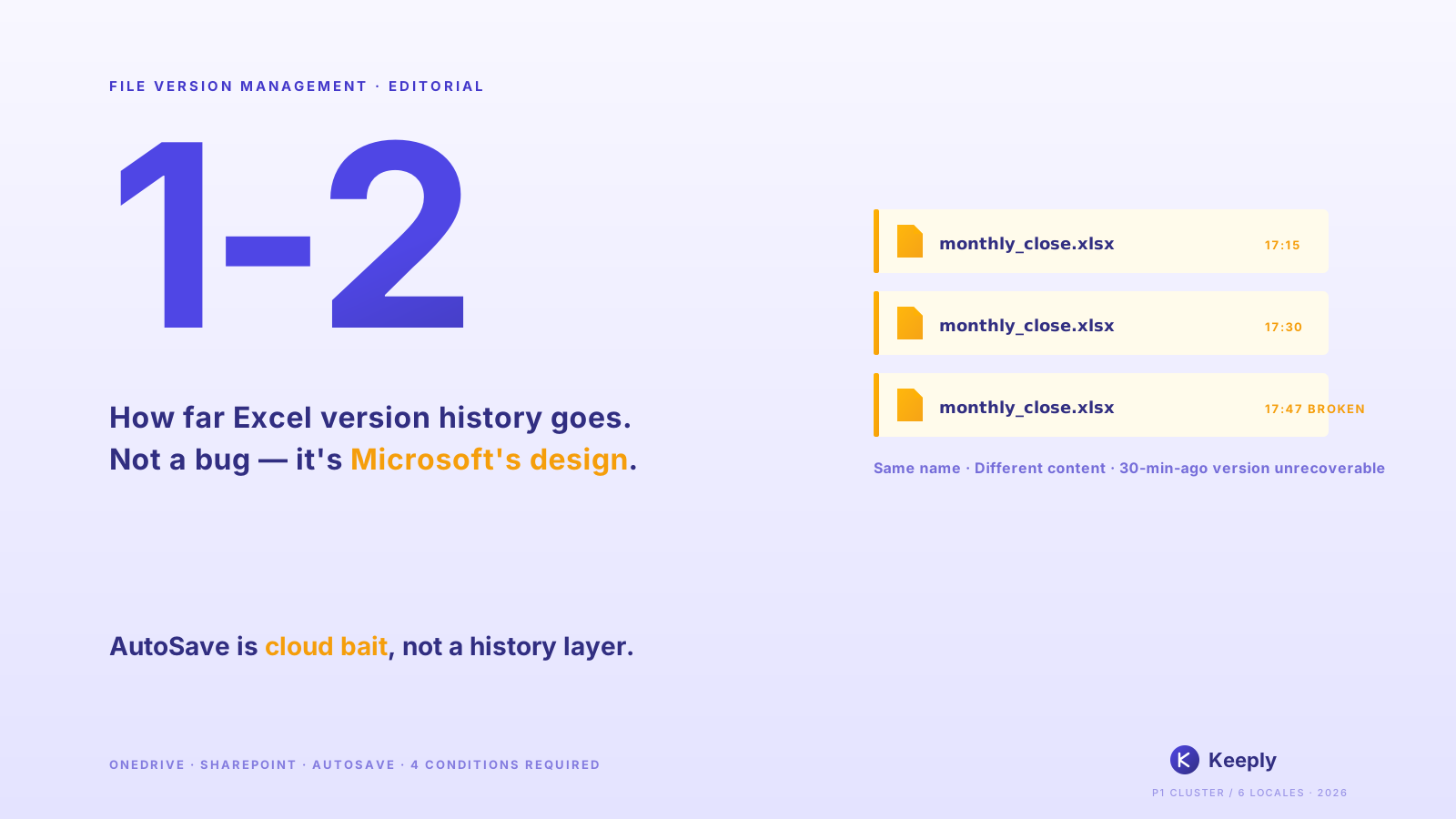
Open Dropbox or Google Drive. Everything’s the latest. Version history is hidden three menus deep. You wouldn’t know unless someone told you.
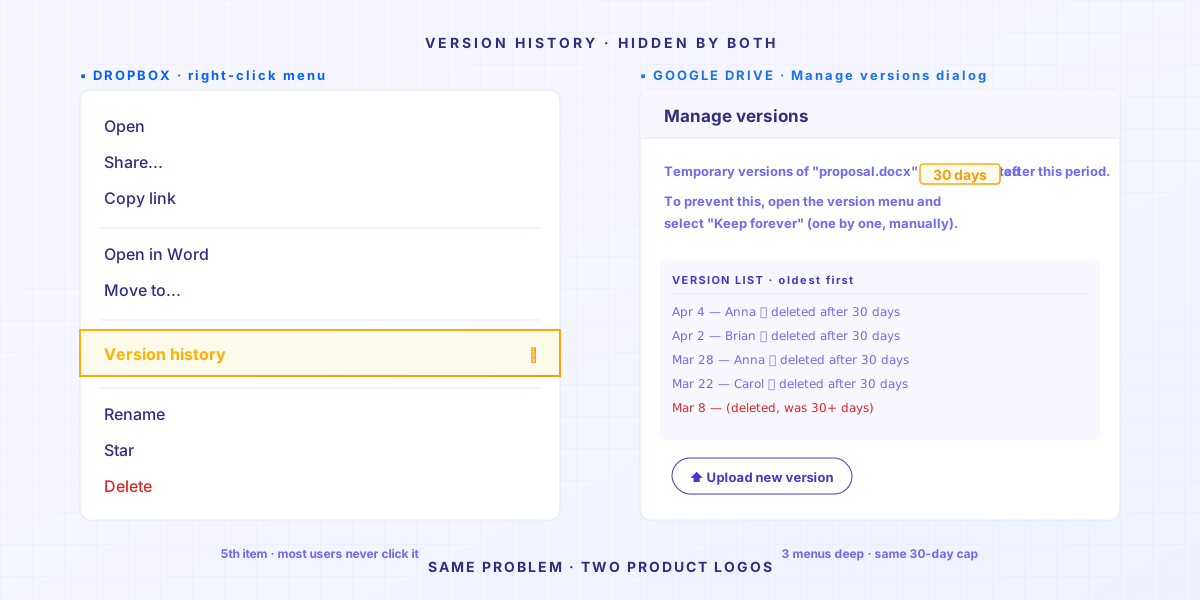
Open the company NAS. Those messy version numbers up there are your version history.
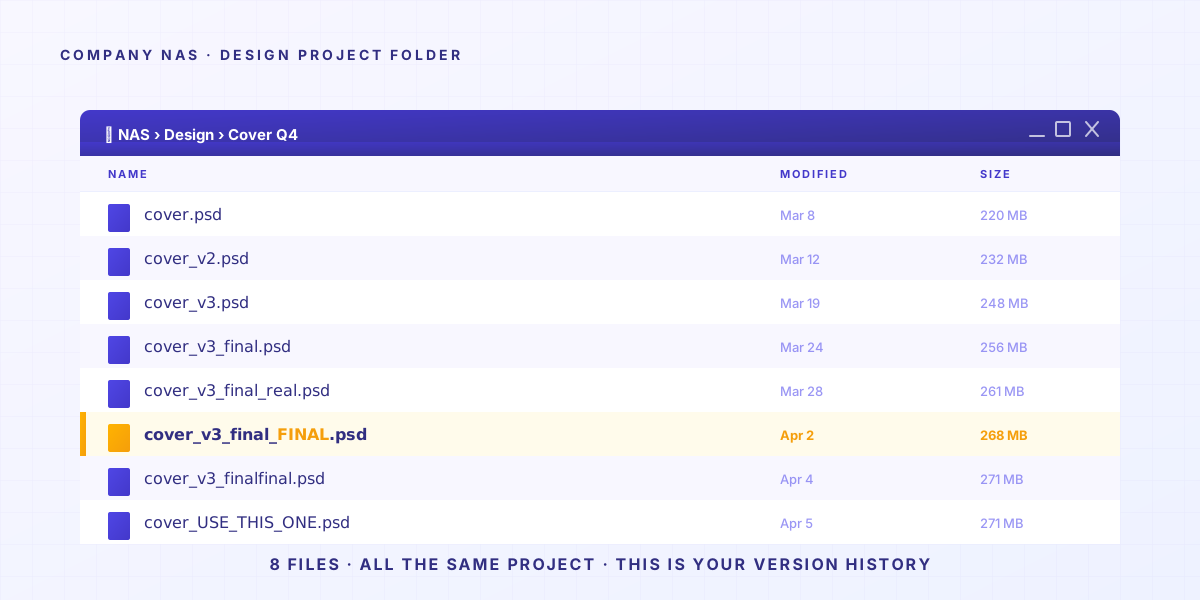
These tools were never designed to manage file history.
What cloud drives care about most is making your files look identical across three devices. That goal fights with “keep every old version”.
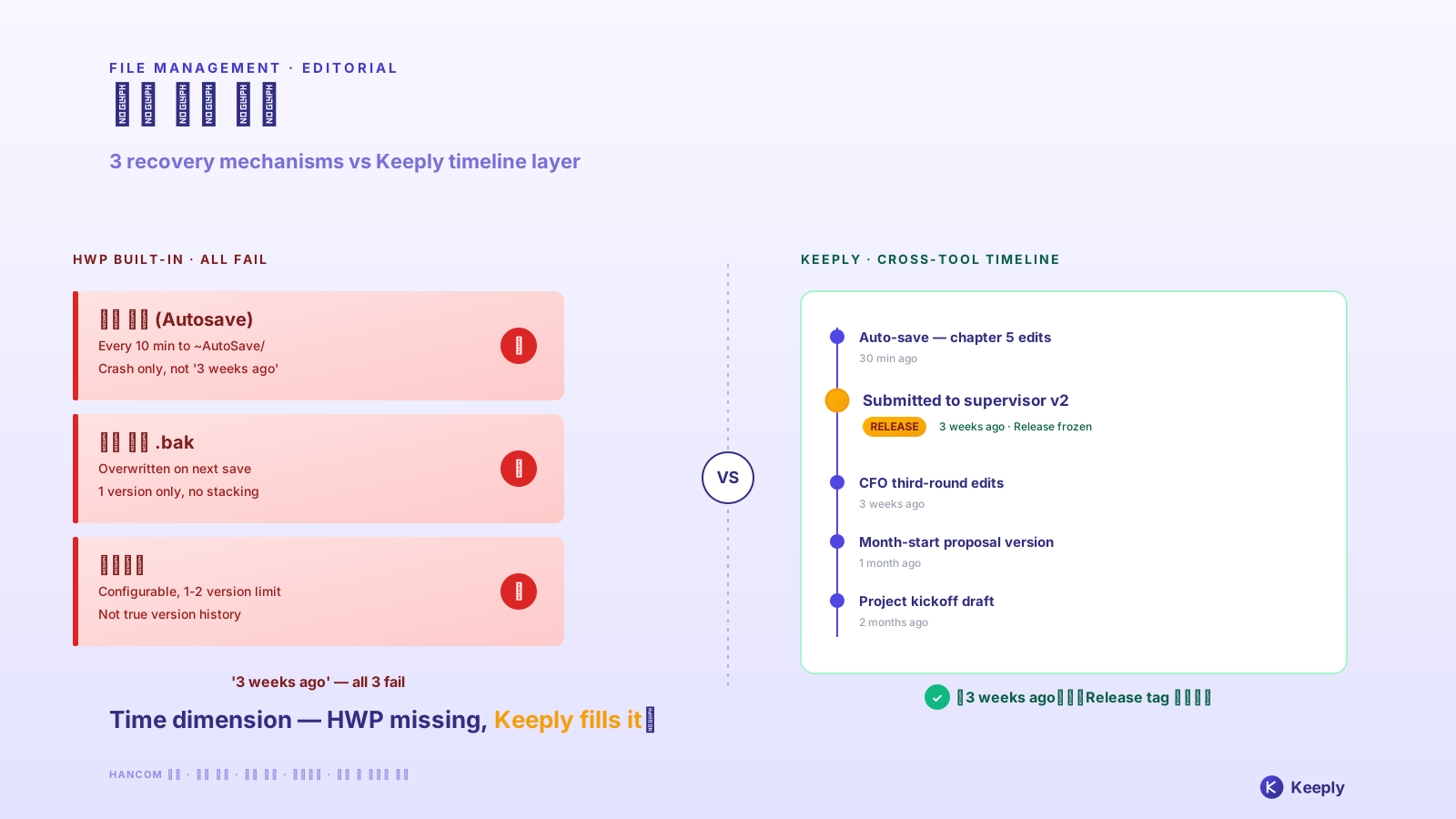
So tools picked sync. They don’t show you the timeline of changes.
In 2015, UCSD linguistics PhD Will Styler lost his dissertation files. He had 7 different backup plans. Every single one failed. He wrote up the post-mortem for future grad students. The closing line: “Redundancy doesn’t prevent stupidity.” Full incident
→ Related: Why your master’s thesis on a single laptop is a gamble nobody warned you about
2. The 30-day version history has fine print
Dropbox gives you 30 days of version history and that’s it. The 30-day cap isn’t a technical limit — it’s a business decision. Apple has shipped Time Machine on every Mac since 2007: it quietly saves a snapshot every hour, and getting back the file you had three months ago is two clicks, for free. The technology has been ready for nearly two decades. Dropbox hides anything older than 30 days specifically so you’ll pay to see it.
Good. You found out Dropbox actually has version history. Relief?
Wait. The next bad news is on its way: a 30-day cap.
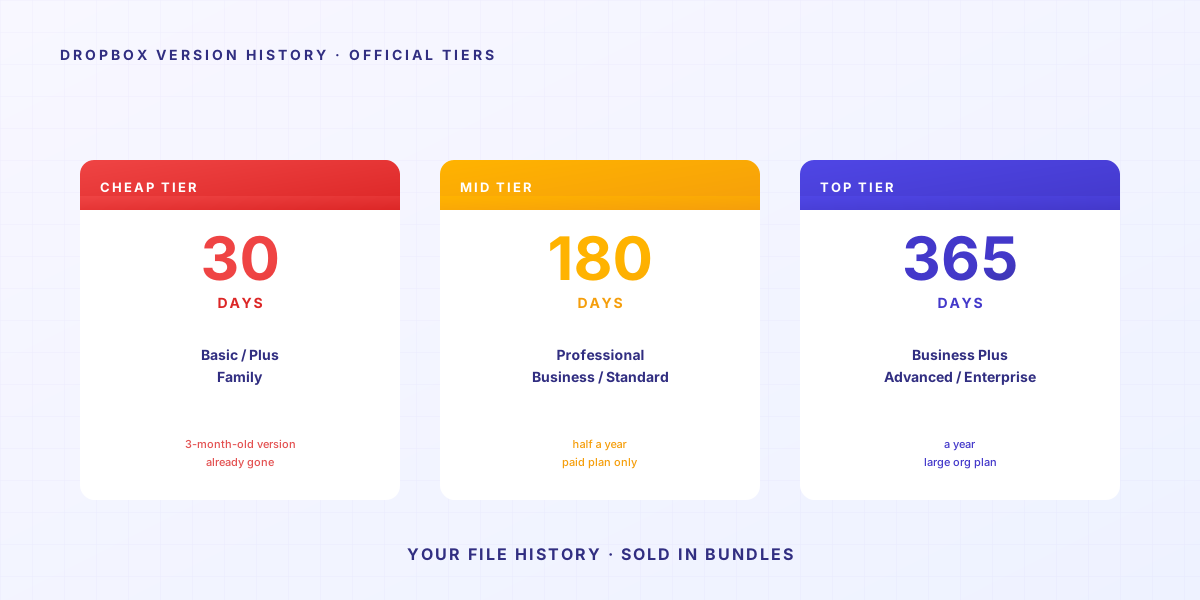
Translate to daily life: you want last quarter’s client brief? Unless you’re paying enterprise, it’s already gone.
Version history turned into a reason to upgrade. (Keeply gives you file history that’s free, forever.)
April 2026, Hacker News. User julianozen posts: their dad overwrote a file that hadn’t been touched in 2 years. Two days later, he tried to recover it. Couldn’t. Dropbox’s reason: outside the 30-day retention window. julianozen’s reaction: “That’s not what 30-day history means.” A reply from lazide: “Which is bonkers.” Full thread
The 30-day window was designed for “I accidentally overwrote yesterday’s file.” For “my client wants last quarter’s pitch back next week” — using the wrong tool rarely gets you what you want.
→ Related: The hidden cost of shared folders
3. Version history tells you when — but why doesn’t it tell you why?
Version history records who changed something and when — but not what they meant by the change. A designer drops one layer’s opacity to 30%. A lawyer flips a contract clause from “shall” to “may.” A grad student rewrites “this argument has limitations” as “this argument clearly stands.” The log shows “modified” in all three cases. It can’t tell you the meaning got flipped.
Suppose you’ve solved the first two: history’s on, 30 days is enough. There’s a deeper problem waiting.
Version history says “modified 2025-04-15 14:23”. It doesn’t tell you what changed at 14:23. It doesn’t tell you why.
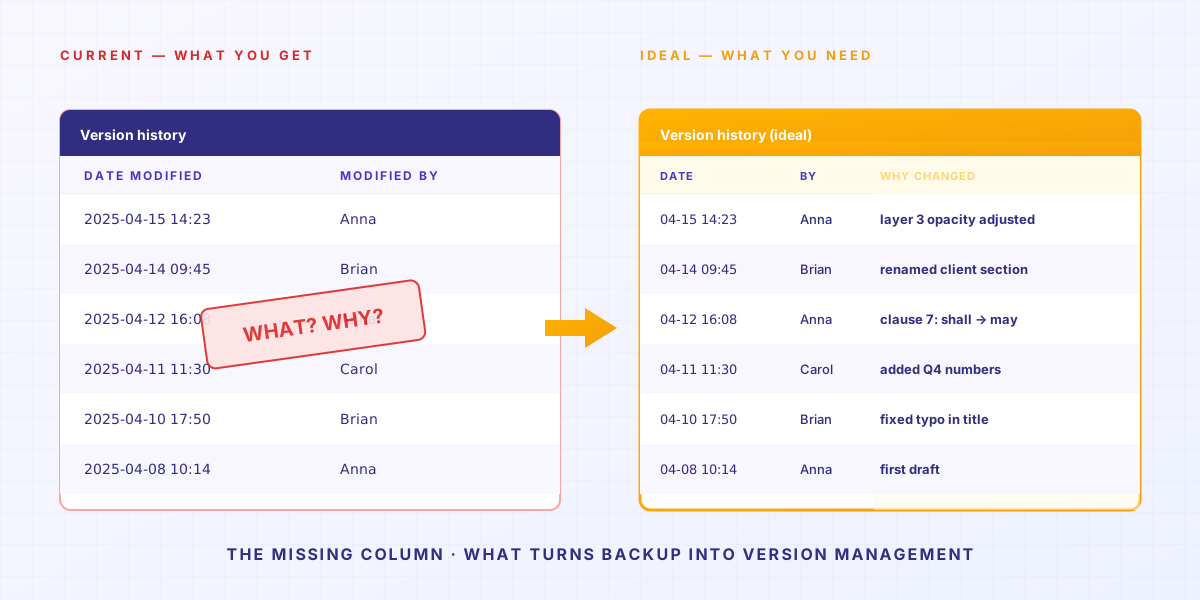
For some jobs, that’s fine. For others, it’s lethal:
- A designer changed one layer’s opacity to 30%. History says “modified”. Doesn’t say which layer.
- A lawyer changed a contract clause from “shall” to “may”. One word. History says “modified”. Doesn’t say which word.
- A grad student changed “but this argument has limitations” to “this argument clearly stands”. From cautious to assertive. History says “modified”. Doesn’t say the meaning’s been flipped.
January 2025, Legal Cheek published an anonymous solicitor story: “I sent the wrong will to the wrong dead person’s family as an enclosure as a trainee.” The disaster wasn’t “no version saved”. It was “didn’t know which version was current.” Full story
Here’s where most people get it wrong.
Backup means keeping the file. Version management means keeping the file plus a record of what you changed and why.
Backup gives you the first. Management gives you the second.
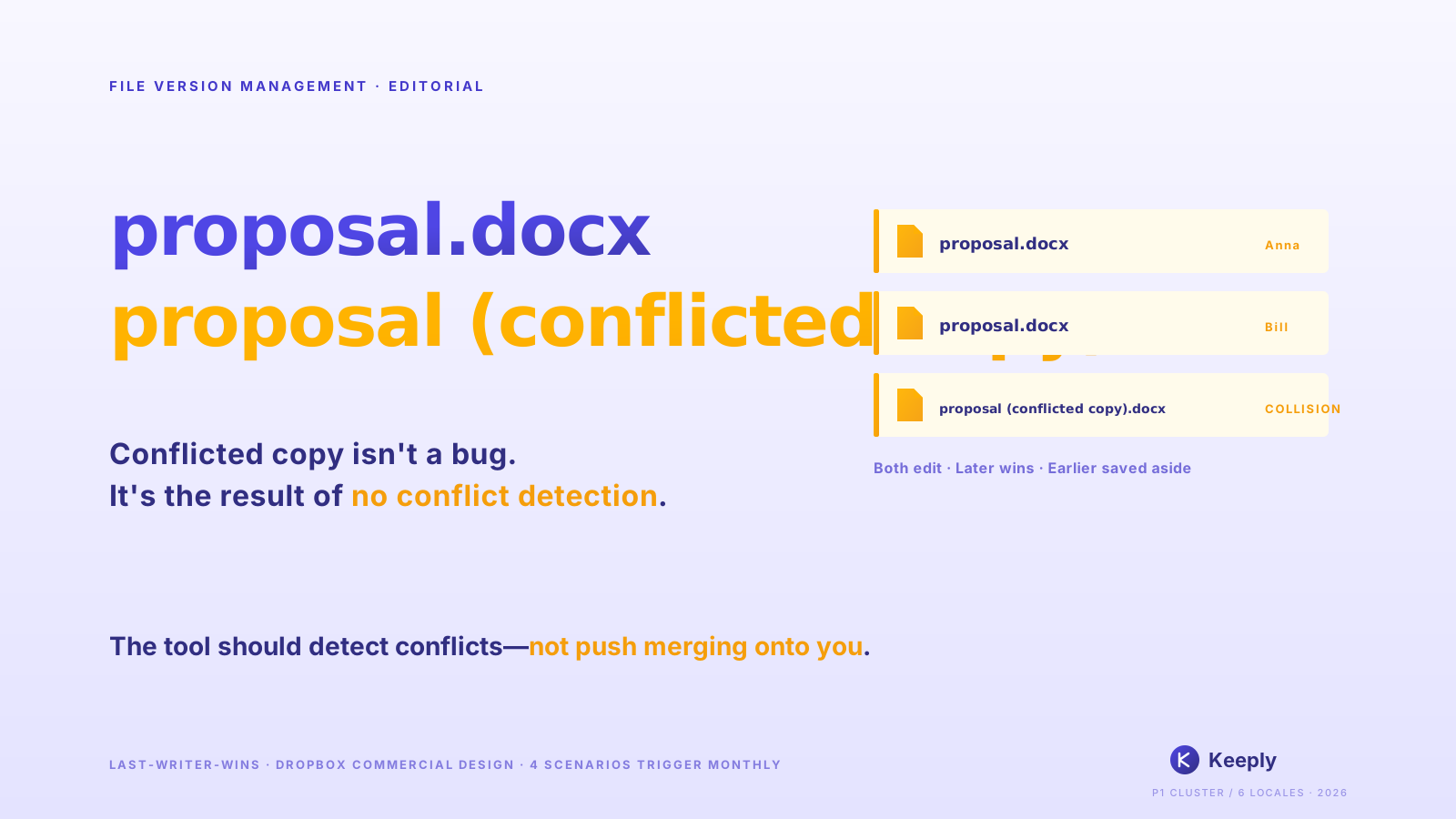
Here’s a concrete example. When the version history just says “proposal.docx changed,” the timestamp alone tells you nothing. Open the two versions side by side:
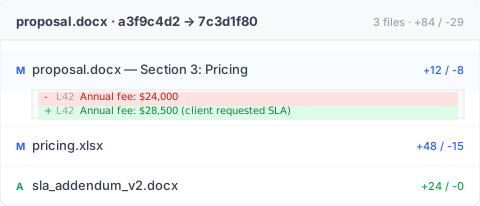
L42 annual fee 720,000 → 855,000, with “client asked for SLA” written next to it, and an extra sla_addendum_v2.docx showing up at the same time — three seconds and you know why this version jumped in price. Version management isn’t post-hoc comparison, it’s writing the decision down at the moment of decision.
So you start cramming intent into filenames: contract_v7_per_client_request_clause3.docx.
The filename runs out of room. You open a spreadsheet. The spreadsheet can’t keep up. You start a Slack channel.
Eventually your “version management system” is filenames + a spreadsheet + Slack + your memory. Any one piece fails, the whole thing tilts.
Three months later, you open your records and find your own past habits don’t match your current ones.
4. Naming conventions push memory onto people
Naming-convention PDFs fall apart within six months. Not because your team is lazy — because the rule asks every person, every save, to remember + agree + have time to type the right filename. Skip any one of those (like a deadline-stressed save called “FINAL”) and the whole system collapses. What you end up with: FINAL, FINAL_v2, really_final.
After hitting all three problems above, every company does the same thing — writes a 14-page naming convention PDF.
Usually it looks like this:
| |
Very tidy.
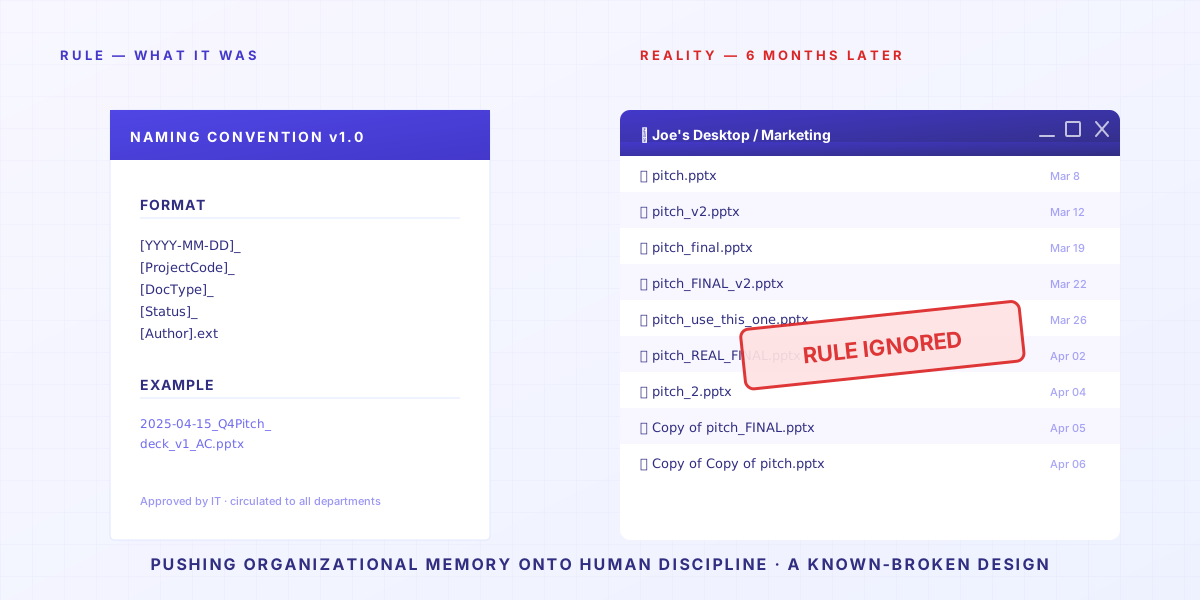
Then six months later, nobody follows it.
Not because your coworkers are lazy. It’s that we’re trying to control a population of uncontrollable creatures, and the ending writes itself.
Asana forum, June 2023, a thread on “epic file-naming fails.” Becky_Caday: “Multiple versions of the same file because someone didn’t know they could open and edit the original. They just changed one word to all caps.
List 2.0becameLIST 2.0.” Arndt_Dienstbier: “They were using whitespace for versioning” (multipleDocument.docxfiles distinguished only by trailing spaces). Full thread
Every team member, every save, has to remember + agree + have time to follow the rule. Any one of those fails, congratulations. You’ve got another mess.
And when the mess wins, you don’t find the old version — you rebuild it from scratch. The same M-Files survey found 83% of workers worldwide are forced to recreate documents that already exist somewhere. The version was there the whole time. Nobody could find it.
Remembering a naming convention is something a tool should just do. Not something to push onto every individual’s discipline.
→ Related: When the AutoCAD crew loaded the wrong version
5. When is Keeply not the right answer for file version management?
There are four scenarios where Keeply isn’t the answer: live shared meeting notes, 50GB+ video footage, contracts going to outside law firms, and enterprise IT with strict access controls. Each has a better tool, and we’ll go through them below. Keeply is built for the case where you (or your small team) keep coming back to files you’ve worked on for weeks or months.
We built Keeply to fill these 4 structural gaps. But there are scenarios where Keeply isn’t the answer:
- Live collaborative meeting notes → use Notion / Google Docs. Keeply is long-term version memory for individuals and small teams, not a real-time collaboration tool.
- Video footage 50GB+ → use Frame.io / PostHaste. Keeply’s version logic (recording differences each save) doesn’t scale economically to large binary files.
- Cross-organization legal signing → use DocuSign / Adobe Sign. If a contract goes to 10 outside law firms, Keeply isn’t in that compliance framework.
For the other 80% of knowledge-worker scenarios — designers, paralegals inside law firms, accountants, grad students, PM teams, freelancers — those 4 structural gaps will hit you every day. Those 4 gaps are what Keeply is built to close.
Back to the opening question: why does everyone who’s used a shared folder end up inventing their own naming scheme?
Because what they actually wanted was a clean structure, so they wouldn’t make decisions on stale information. So they put versions into filenames, into spreadsheets, into memory.
Pushing organizational memory onto human discipline is a known-broken design.
The question isn’t how to enforce naming conventions better. It’s whether your tool can do that job for you.
Related articles
- Shared folder version problems: the 83-hour micro-panic tax — The real cost of shared folders isn’t lost files. It’s the daily defensive-naming tax everyone pays.
- Masters Thesis Version Control: The Diff You Forgot — Your thesis is one drive failure away from being gone, if you only have one copy.
- Why your crew keeps opening last week’s AutoCAD drawing — The crew keeps getting the old CAD because the office got the new version and didn’t tell the field.
- What the 3-2-1 backup rule doesn’t cover in 2026 — 3-2-1 protects against disaster, not operator-error. Keeply builds 3-2-1 + version history into one tool.
About the author: Ting-Wei Tsao, founder of Keeply. LinkedIn