【2026 File Management】Departing employee deleted your files? Sync isn’t backup
Tina emptied the brand-book folder Saturday night and Dropbox dutifully synced the disaster. Why “sync isn’t backup” is the real lesson — not lawyers, not DLP.
Table of contents
- That Saturday night, 11:03 PM
- The lawyer can’t help; DLP gets there too late
- Why was it so easy for her to delete it
- Switching to Keeply: irreversible history
- What Keeply isn’t going to fix
That Saturday night, 11:03 PM
That Saturday night at 11:03 PM, Tina dragged the entire brand-book folder into the trash at home, and emptied it for good measure.
Within a minute, Dropbox dutifully synced that action to the cloud.
Monday morning, the client called for the original files. You opened the folder — empty. You thought there was still hope, but her manual “empty trash” move bypassed Dropbox’s version-recovery mechanism entirely.
(Dropbox Personal keeps deleted files for 30 days, Business for 180. Neither saves you when the user actively empties the trash. See Dropbox’s own docs.)
You can’t tell whether she copied the files first. You can’t deliver to the client.
The lawyer can’t help; DLP gets there too late
When this happens, you search for answers.
The legal route? Your lawyer will start talking about trade secrets. The catch is, you can’t even produce evidence right now. Even if you spent a year or two winning the lawsuit, that brand-book file would be too stale to use anyway.
Since the law can’t put out the fire, you turn to enterprise security software (DLP). That’s a deeper hole. DLP can block copies, sure, but the monthly fee is wildly out of proportion for a team of a dozen, and you’ll need a dedicated engineer to babysit the system. Worst of all, DLP only defends against the future. What Tina did over the weekend? No DLP license bought today can undo it.
Both paths are trying to solve “what to do after the fact.” Nobody’s asking the real question.
Why was it so easy for her to delete it
Why was it so easy for her to delete it?
Because you used the wrong tool.
Dropbox, Google Drive, OneDrive — none of them are broken. Their core design is “two ends in sync.” You delete, the cloud deletes. You change, the cloud overwrites. Their job is to mirror your action, not to protect your asset.
Using a sync tool as a file vault is like putting the company’s entire backbone in an uninsured naked warehouse.
I built Keeply to fill that missing mechanism layer.
Switching to Keeply: irreversible history
This is why you need real file-version-management software. Its underlying logic isn’t sync — it’s irreversible history.
On Keeply, when Tina deletes a file, you don’t dig through any trash. You open the timeline and pull back the previous version. Even with admin permission, she can’t delete the milestones marked as Release. As for what she touched, the audit trail is nailed down — you don’t need to play detective to piece it together.
How do you actually pull those versions off Tina’s laptop into your own machine? Keeply has a dialog called “cherry-pick” that lets you apply specific versions from another machine or another vault:
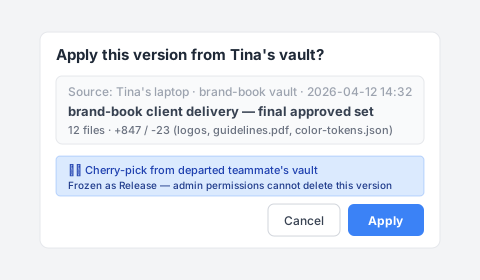
The new owner opens Keeply, picks the brand-book vault from Tina’s laptop, sees the April 12 client-handoff row, writes “brand-book client handoff — full approved set” as the note, and clicks Apply. Twelve files — logos, guidelines.pdf, color-tokens.json — land in the working directory on the new machine all at once. The Release-freeze flags come along with them, so no one can accidentally delete them later either.
What Keeply isn’t going to fix
Let me be honest: Keeply isn’t a silver bullet.
If you want real-time monitoring and USB-stick lockdown on employees, that’s DLP’s job. If you want to revoke Slack or Figma access, that’s standard offboarding. If you want legal advice, talk to a lawyer.
You have to settle one thing first: do you want to spend big money preventing employees from making mistakes, or do you want “no matter what an employee does, I can restore it in a second”?
I built Keeply for the second one.
The next time an employee gives notice, when you open the system at 9:14 Monday morning, you’ll see every file they touched over the past six months, every meaningful change, all sitting safely on the timeline.
You won’t need to worry about what they did during their last weekend before leaving. Because the record was locked down long before then.
About the author: Ting-Wei Tsao, founder of Keeply. LinkedIn