【2026 File Management】You don't need recovery software, you need a Recently Deleted list
iOS Photos, iCloud Drive, Notes, Outlook all show a 'Recently Deleted' list. Finder, Explorer, Dropbox local folders don't. The UX pattern is missing from the tools where you'd actually use it — and that's why you end up googling Disk Drill instead.
【2026 File Management】You don’t need recovery software, you need a Recently Deleted list
iOS shows you what you deleted. Finder doesn’t. The pattern that’s missing from the tools where you’d actually use it.
Wednesday 11:14 AM. You hit Delete on what you thought was the wrong duplicate. Two minutes later, you realize you deleted the right file.
You open the Trash. Empty. You cleared it last Friday.
You Google “recover deleted file Mac.” First result: Disk Drill, $89 a year (or $149 lifetime), requires a forensic scan of your SSD. You’re already googling “is forensic recovery safe for SSDs.”
You don’t need a forensics tool. You need a list.
Tools that already do this, tools that don’t
iOS Photos has a “Recently Deleted” album. iCloud Drive has one. Notes has one. Outlook has “Recover Deleted Items.” Gmail has Trash with 30-day retention.
Collaboration tools, though, often don’t. On Slack’s free plan, a message you delete is gone for good — that “90 days” is just the visible-history cap, not an undo button. Even Slack doesn’t do the seemingly basic thing of getting back what you deleted.
Then there’s the half of the table where you actually work.
| Tool | “Recently Deleted” list? |
|---|---|
| iOS Photos | ✅ 30-day album |
| iCloud Drive | ✅ Recently Deleted, 30 days |
| Notes (iOS / macOS) | ✅ 30-day folder |
| Outlook | ✅ Recover Deleted Items |
| Gmail | ✅ 30-day Trash |
| Slack | ⚠️ no “undelete” — 90 days is the visibility cap, not restore |
| macOS Finder | ⚠️ Trash 30 days, but no per-folder list |
| Windows Explorer | ⚠️ Recycle Bin only, lost when emptied |
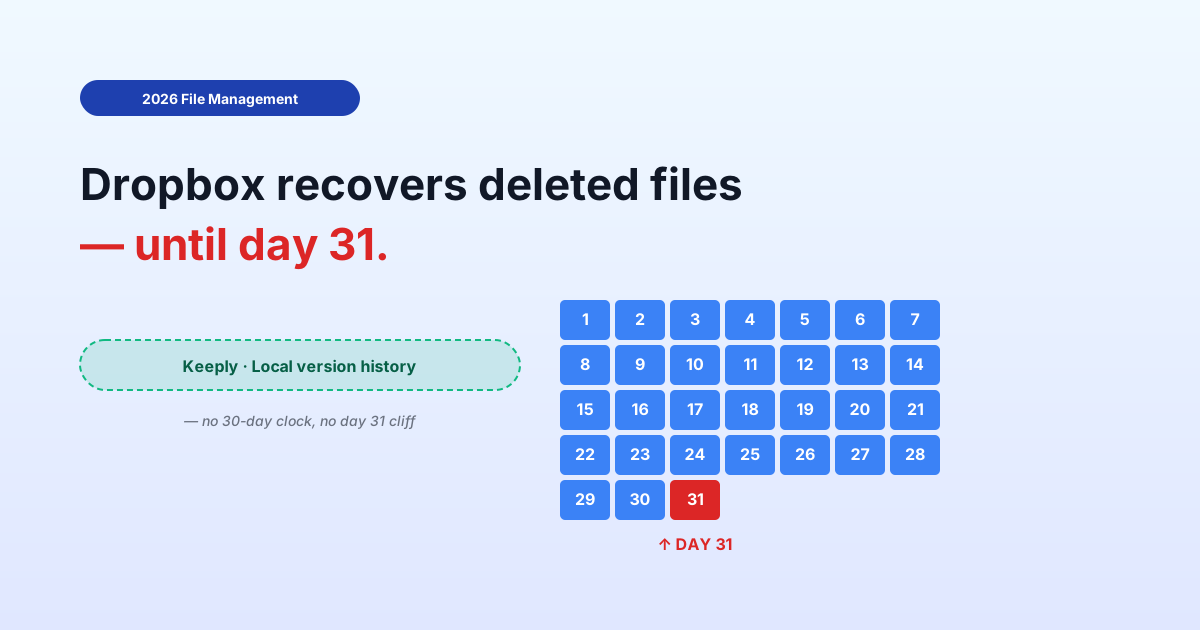
| Dropbox local folder | ❌ Vanish locally (online: Basic 30 days / Pro 180 days to recover) |
| Google Drive local sync | ❌ Same as Dropbox |
| Generic version-control tools | ❌ “Browse history” required |
The bottom half is exactly where you keep your real work. The top half is where you’d probably be fine without the feature.
Why is this pattern missing where you need it most?
The “Recently Deleted” affordance lives in apps with a curated content model (photos, notes, emails). It’s missing from tools that treat your files as a transparent filesystem mirror.
Curated apps (iOS Photos, Outlook, Notes): you don’t “manage files,” you “interact with content.” Recently Deleted is a content-management primitive — the mental model demands it, the designers built it.
Filesystem mirrors (Finder, Explorer, Dropbox local sync): these were built to transparently reflect what’s on disk. Adding a “Recently Deleted” view violates the transparency contract — if the file’s gone from disk, why does this folder still show it?
The cost of that transparency: you inherit OS-level Trash / Recycle Bin only. After empty, the file looks gone everywhere — even if version control or cloud sync still has a copy. The recovery path becomes “open the timeline log, find the day, find the file, restore.” High friction. Easy to skip. Easy to default to forensics tools instead.
So you end up at Disk Drill’s pricing page, not because forensic recovery is the right tool, but because the right tool — the list — wasn’t surfaced.
The 30-second recovery path the UI didn’t surface
When the tool surfaces a Recently Deleted list, recovery is about five seconds. When it doesn’t, recovery is either five minutes of timeline-digging, or $89 and two hours of forensic scanning that may or may not work on an SSD.
The right design for this pattern, when a tool implements it well:
- Surface it at the top level — sidebar entry or main tab, not buried three clicks deep
- Group by time — “Today / Yesterday / This week / Earlier,” not a flat list of 200 deletions
- Show the original path — which folder did this come from? Critical for confirming “yes, that’s the one”
- One-click restore — no version picker, no three-step “are you sure” wizard. Click → restored to original path
- No forensics required — this is recovery from your own intentional save history, not from raw disk sectors
Keeply implements this as the “🗑️ Deleted Files” panel: 30-day list of files deleted in the projects you’ve added, grouped by time, one-click restore to the original folder. The act of restoring creates a new save point — so the undo itself is versioned, and you can undo the undo.
Keeply — Recently Deleted

Today
─────────────────────────
🗑️ proposal_v7.psd       ◀ 11 min ago    /designs/2026/
🗑️ pricing-notes.docx    ◀ 47 min ago    /designs/2026/

Yesterday
─────────────────────────
🗑️ old-logo-export.png   ◀ 1 day ago     /assets/branding/
Here’s what it looks like in the actual panel: each file shows its original path and a restore button right next to it.
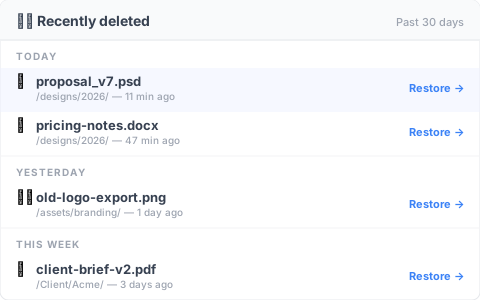
It isn’t a forensic tool. It’s a list with restore buttons.
Works inside any folder you add to Keeply — your Dropbox local folder, your iCloud Drive folder, your project directory on a Synology NAS, a plain folder on your laptop. You don’t migrate; you add the list as a layer above what’s already there.
When the list isn’t enough
This pattern doesn’t solve every deletion scenario. Three boundaries to call out:
You emptied the Trash six months ago and never had version control running. This article’s pattern doesn’t apply — you’re in real forensics territory now. Disk Drill or Recuva may help, but there’s a separate piece on why even those often fail (SSD TRIM is the short version).
The deletion happened on a remote share you don’t control. If IT admins or a team lead emptied a SharePoint Recycle Bin past the 93-day window, the list never existed on your side. The fix is an admin-policy conversation, not a software install.
You’re recovering edits inside a file, not the file itself. Single-cell rollback in Excel, undoing a specific paragraph in a Word doc — that’s a different problem, covered here for Excel and here for Word.
See also
The full pillar file version management complete guide breaks down 4 structural reasons your tool wasn’t designed for keeping file history.
Recover deleted file from Windows 10: 4 cases recovery software fails — the forensics-angle counterpart to this article: when the list-based recovery is too late, here’s why the alternative often fails too.
The limit of overwritten file recovery: when AutoRecover isn’t enough — a different recovery scenario (overwrite, not delete), same theme: tools are categorized by what they were built for.
The friction in file recovery isn’t a technical limit. It’s a UI design choice — to show or not show what you’ve deleted.
The tools that show it (iOS, Outlook, iCloud) save you the panic spiral. The tools that don’t (Finder, Explorer, generic sync clients) push you into forensics territory you didn’t need to enter.
Pick tools that surface this pattern. Or add a layer that does. Wednesday morning, two minutes after the wrong Delete, the answer is “click, click, restored” — not “let me Google what Disk Drill costs.”
About the author: Ting-Wei Tsao, founder of Keeply. LinkedIn